Combat
Attributes
Apply Attributes
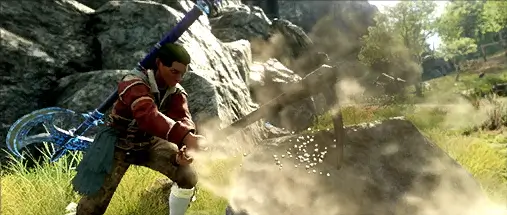
There are five attributes you can assign points to in the Character screen that can improve your weapons or increase your health. Each weapon has a primary attribute and a secondary attribute. Assign points to their primary and secondary attributes to increase their damage or healing effectiveness. Earn additional bonuses at various thresholds of each attribute.
 Hover over
  next to each attribute in the character screen to learn more.
You can respec attributes for free until level 60.
Primary Attributes
Every weapon has a primary attribute. A primary attribute will have the most impact on the weapon’s damage scaling.
Secondary Attributes
Weapons also have a secondary attribute that increases weapon damage at a reduced scale compared to its primary attribute, though some weapons have balance scaling with both attributes. For example, the primary attribute for the Spear is Dexterity, it has A tier scaling for this attribute. The secondary attribute for the Spear is Strength which C tier scaling.
@ Discover primary and secondary attributes by hovering over the information icon next to each Attribute in the Character Screen.
Focus And Healing
Healing is exclusively scaled by Focus. For example, if you use a Void Gauntlet and only apply attributes in its primary attribute, Intelligence, you will miss out increased Healing effects you could receive from applying attributes in Focus.
Attribute Threshold Bonuses
Each attribute has bonuses that are activated by raising the attribute to a threshold. Hover over the circles in each attribute’s progress bar. to learn more.
Combat Status Effects
Status Effects
Status Effects are buffs or debuffs you can apply to yourself or opponents.
Active status effects are visible above your own health bar and on enemy nameplates. Buffs, positive status effects, have a black background while debuffs, or negative status effects, have a red background.
Status Effect Categories
Status effects have a category or type assocated with them that you can find in item perks and weapon mastery tooltips.
The main two status effect categories are buffs (positive effects) and debuffs (negative effects), with debuffs being broken up into 3 separate sub-categories:
- Damage over Time (DoT): Effects that deal periodic ticks of damage for the duration of the effect.
- Debilitate: Effects that modify the power of the target.
- Crowd Control (CC): Effects that modify the movement, speed, and positjoning of the target.
Buffs
Buffs are positive effects that increase a character’s power. Buffs are represented with a black background.
Common Buff Status Effect Categories:
 Empower: Increases the player’s outgoing base damage by a percent.
 Fortify: Increases the player’s armor by a percent.
 Haste: Increases the player’s movement speed.
 Anointed: Increases how much health the player gets from incoming healing.
 Uninterruptible: Prevents the player from being affected by staggers and knockdowns
Debuffs
Debuffs are negative effects that hinder or decrease a character’s power. Debuffs are represented with a red background.
Common Debuff Status Effect Categories:
 Weaken: Debilitate effect that reduces the outgoing base damage by a percent.
 Rend: Debilitate effect that reduces armor by a percent.
 Disease: Debilitate effect that reduces how much health the player gets from incoming healing.
 Slow: Crowd Control effect that reduces the movement speed.
 Root: Crowd Control effect that immediately halts movement.
 Stun: Crowd Control effect that immediately halts movement and prevents the target from performing actions for the duration of the effect, or until a hit is taken.
Damage And Enemy Types
Damge Types
Each weapon has a default damage type. Some attacks and abilities will use a different type than the weapon’s default. Certain gems can be used to convert a portion of the damage to a different type.
 Slash
Slash Thrust
 Strike
 Fire: Conversion gem: Ruby
 Ice: Conversion gem: Aquamarine
 Lightning: Conversion gem: Topaz
 Nature: Conversion gem: Amber
 Void: Conversion gem: Amethyst
 Arcane: Conversion gem: Sapphire
When you hit something with an attack or ability, a number will fly out showing the amount of damage with the damage type icon next to it. When targets are weak  or resistant
  to a damage type, you will do more or less damage in these cases and the number will be a different color.
Enemies
Each type of enemy has one or more weaknesses to different damage types and are grouped into one of these categories.
- Corrupted: Corrupted creatures and structures are dark and glowing red.
Weakness - Thrust, Arcane, and Nature damage. - Lost: The Lost are soulless phantoms and shambling corpses.
Weakness - Strike, Ice, and Nature damage. - Beast: Animals large and small.
Weakness - Thrust. - Ancient: Living skeletons from an ancient civilization.
Weakness - Strike, Lightning, and Void damage. - Angry Earth: Nature that has taken humanoid, animal, and monstrous forms.
Weakness - Slash and Fire damage. - Human:
Weakness - Slash damage.
Enemy Blocks
Enemies can block your attacks as long as they have stamina. While all attacks reduce stamina, heavy attacks will reduce an enemy’s stamina faster and break their blocks.
Equip Load
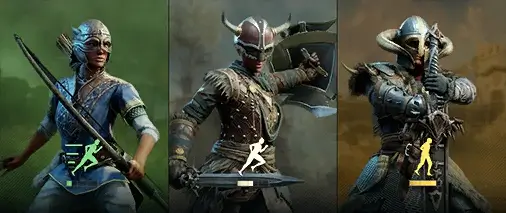
Your Equip Load is an important part of your combat style. For example, Light Equip Load allows you to roll around enemies as you dodge, while a Heavy Equip Load's dodge is a shorter and less agile step but much more sturdy. The three equip loads are Light, Medium, and Heavy.
Your Equip Load is determined by the total weight of all of your armor, so you can combine a variety of different gear weights. Learn more about each load by opening your inventory and hovering over your equip weight found next to your character.
Grit
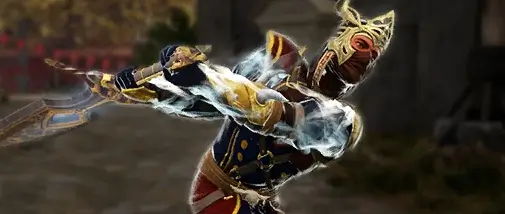
If you or an enemy glow white during an attack, the attack has Grit and cannot be interrupted. Grit allows the attack to finish even if hit by an attack that would normally stagger or knock down the target.
The only exception is if the attacker is stunned. Stun instantly stops all character’s actions when applied even if Grit is active.
If you are going up against a target with Grit attacks, equip a weapon with e; stun. Inversely, if you plan on capitalizing on your own Grit, keep an eye out for attacks that inflict stun.
Health Potions
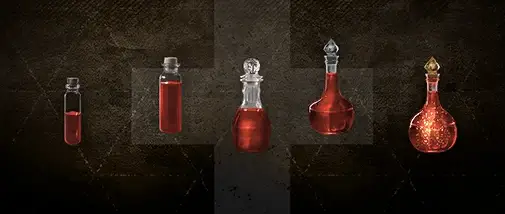
Health potions and other consumables are critical to your survival in Aeternum. Equip them from your [Tab] inventory.
Potions can be found around Aeternum, bought at the Trading Post, or crafted in town or at your camp. Health Potions, in addition to regeneration potions and food, help maintain your health while adventuring. Unlock higher tier health potions as you level.
Consumables, including Health Potions, have a cooldown once you use them.
Target Lock
[Middle Mouse] Use to Target Lock the closest enemy to your reticle. Your camera will be focused on the indicated target.
Cycle through nearby targets using [Wheel Down]. Your Target Lock will break if you lose sight of the target, get out of range, or your target dies.
Release Target Lock by pressing [Middle Mouse] again."